Access via Web Portal
Overview
Use this access method if you want to
The Mamori web console is what administrators use to manage the Mamori server configuration and also what end users use to access their resources.
From the web console a non-admin user can
- See active permissions
- Request and endorse on-demand resources and policies
- Connect to RDP, SSH, and HTTP/S resources
- Access the secret vault
- Run database commands in the Web SQL editor
Additionally administrators can
- Configure the Mamori server
- View logs
- View monitoring dashboards
For remote access to the Mamori web console
- Open tcp port 443 on your Mamori server's firewall
- Forward tcp port 443 from your public firewall to the Mamori server
Web Console Access Security Layers
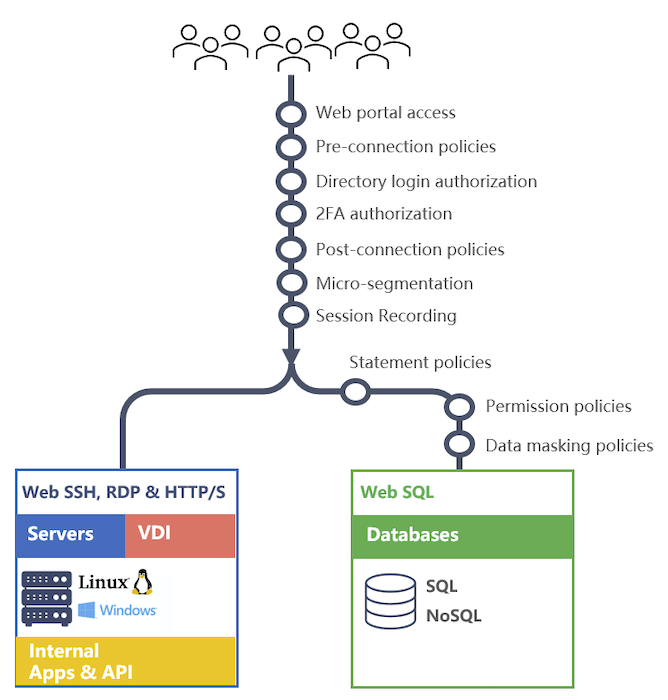
Enabling Modules
The web console menus will change based on the enabled modules.
To enable/disable modules do the following
Click Server Settings > GeneralScroll to the module section and enable the desired module(s) relevant to the web console access
- Database Access Controls (DBPAM)
- Data Privacy Controls
- SSH Access Management
- Remote Desktop Access Management
- Application Access Management
- Secret Management
Configuration Steps
Prerequisites - Completed Common Configuration
- Configured identities & roles
- Configured 2FA provider
- Verified the mamori server can access the target resources
If on-demand resources are going to be used
Step 1 - Configure Mamori data sources & datasource credentials
Step 2 - Configure Data Access Polices
Step 3 - Configure SSH, RDP, HTTP/S and Secrets
Step 4 - Lockdown service accounts that will not be multi-factored
Manage Secrets
For detailed information on creating and managing Secrets, see Secrets.
Mamori allows you to store binary(file) or text secrets. Access to a secret can then be provided via a direct grant, a role or as an on-demand resource. To create and manage secrets:
Click Secrets